
Clipboard history
Everything you copied, one keystroke away
Press ⌃⌥V in any app: text, images, links, colors and files you copied are there, with a preview. Pick one and it is pasted where you were.
- ⌃⌥V from any app
- Pinned items
- Passwords never kept
7 days free with every feature, no account, no card. Then $49.99 once for up to 3 Macs, every future update included — no subscription.

In short
Folia Files keeps a history of what you copy on your Mac and brings it back with ⌃⌥V from any app: text (plain or rich), images, links, colors and files, with a preview. Pin what you paste again and again with ⌘P. Content marked as private by password managers is never read, and the history is stored only on your Mac, outside backups. It is off until you turn it on.
Paste anything again
The palette opens over the app you are in, without taking it away. Search what you copied, preview it with the Space bar, press ↩ to paste — or ⌥↩ to paste it as plain text. ⌘1 to ⌘9 paste the first nine items directly.
⌃⌥V open the history⌥↩ paste as plain text⌘P pin⌘⌫ delete
Pinned items never expire
Your address, a signature, a snippet of code: pin it once and it stays at the top of the history and in the menu bar, whatever you copy next.
In the menu bar, the drawer and the sidebar
The last six items are in Folia Files' menu bar menu — one click pastes into the app in front. The history is also a module of the drawer and of the right sidebar.

Private by design
Content that password managers and other apps mark as concealed or transient is never read. Password managers are ignored by default, and you can add any app to the list.
The history lives in a private folder on your Mac, excluded from backups, never in iCloud. You choose how long items are kept and how many.
- Off until you turn it on
- Nothing sent anywhere
- Ignored apps of your choice
See it in action
-
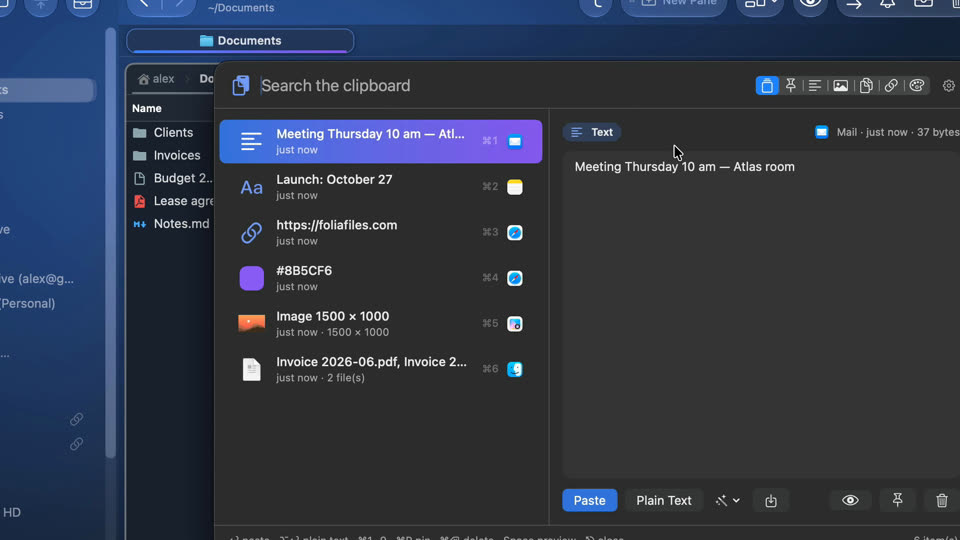
Clipboard history
Press ⌃⌥V in any app: everything you copied is there. Type a few letters, press Return, and it's pasted where you were.

-
Clipboard history with ⌃⌥V
Everything you copied, in any app: type a few letters, press Return, and it's pasted.

Website edition and Mac App Store
The clipboard history is in both editions. To paste directly into other apps, macOS asks you once to let Folia Files send the ⌘V keystroke; without it, the item is copied and you press ⌘V yourself. Since macOS 15.4, set “Paste from other apps” to Allow for Folia Files in System Settings › Privacy & Security.
Questions
No. Items marked as concealed or transient — what 1Password, Bitwarden and other password managers copy — are never read, and password managers are ignored by default.
It comes with Folia Files and works from any app as long as Folia Files is open (it can start at login and stay in the menu bar).
macOS 15.4 and later ask before an app reads what other apps copied. Choose Allow for Folia Files in Privacy & Security › Paste from other apps.
Keep reading

See for yourself, free for 7 days
Every feature, no account, no credit card. Then $49.99, once, every future update included — no subscription.