
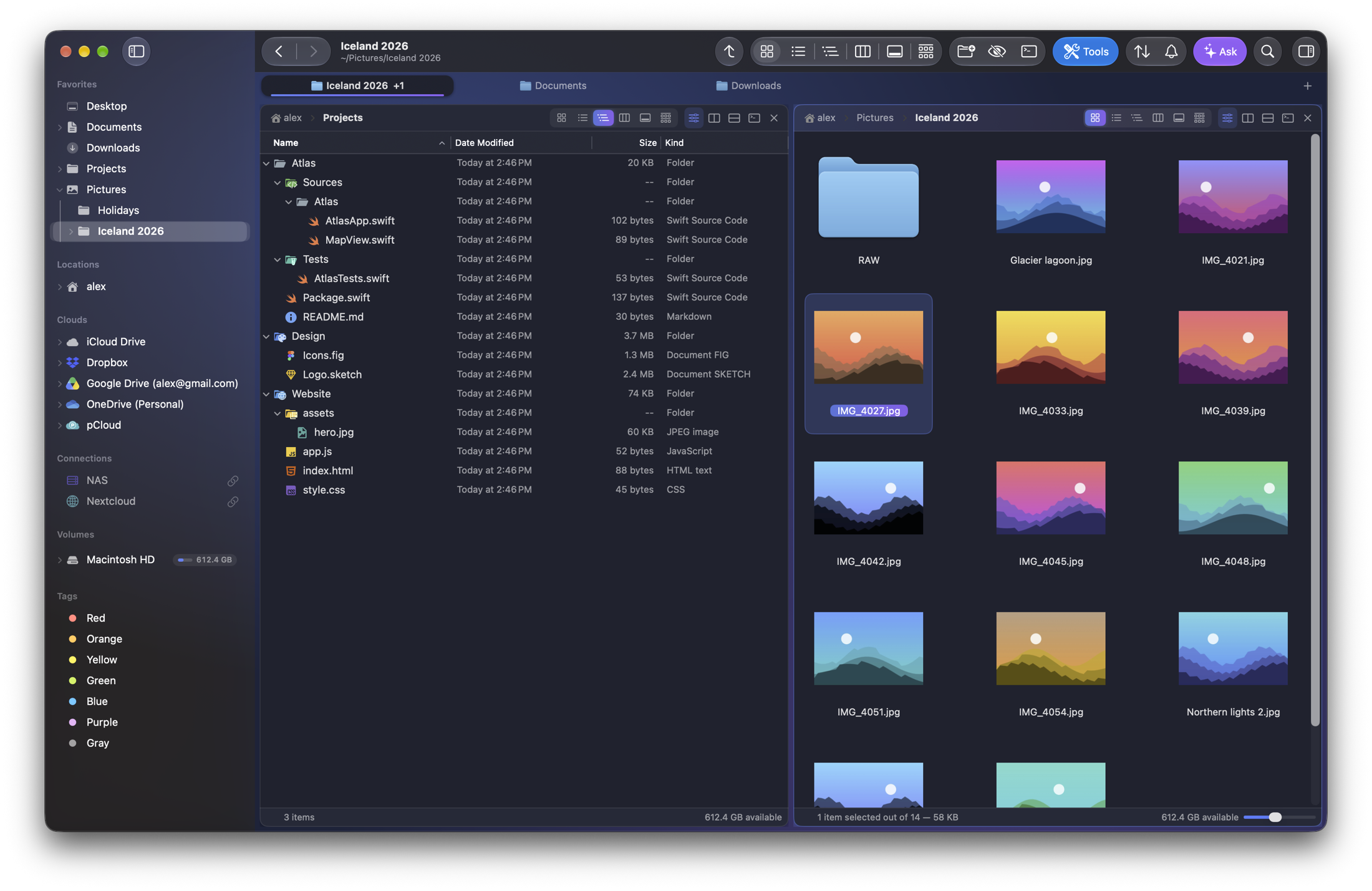
Every folder, side by side.
Split the window as many times as you like, keep a tab per project, and unfold your whole disk in a single tree. Copying to the other pane is one keystroke away.
New · Folia Files 1.0 for macOS
Tabs and split panes, a search that answers as you type, a living map of your disk — and every tool you used to hunt for online. Native, fast and private.
7-day free trial, then $49.99 once, no subscription · macOS 14 or later
Features
A complete, native and fast file manager — with the tools you used to look for elsewhere.
Split the window as many times as you like, keep a tab per project, and unfold your whole disk in a single tree. Copying to the other pane is one keystroke away.
Folia Files keeps its own index of your files, always up to date. Results appear while you type — and the search looks inside your documents, your PDFs and even the text in your screenshots.
Search by meaning: “electricity bill” finds the right invoice. Folia Files suggests clear names for your screenshots, scans and photos, and understands a sentence like “photos over 5 MB from this year”. It all happens on your Mac.
Space Lens draws any disk or folder as bubbles: the big ones jump out. Click to dive in, review, and send what you don't need to the Trash — then see exactly what grew since last week.
iCloud Drive, Dropbox, Google Drive, OneDrive, pCloud or Box — installed with their apps — in the sidebar, and your SMB, WebDAV, FTP, AFP and NFS shares one click away.
A panel slides in from the edge of the screen, over every app: the shelf, where you set files down in passing, and your favorites. Grab an attachment, drop it into a document, file it in one gesture — without ever looking for Folia Files's window.
Folia Files remembers everything it did to your files — copies, moves, renames, trash, tags — and lets you undo any line. Even last week's.
Eight built-in themes, or your own: accent colors, tinted surfaces, an animated aurora, selection style, corners and density. Folder colors and emoji show up everywhere on your Mac.
No account, no tracking, no data collected. Folia Files does its thinking on your Mac — your files never leave it.
Tools
Everything you used to download a separate app for — built in, one keystroke away, and every change can be undone.
Exact fingerprints, not guesses. Keep the right copy, trash the rest.
⇧⌘UReplace, number, date, change case, regex — with a live preview.
⇧⌘RWhat's missing, newer or different — or two text files line by line.
⇧⌘KMerge, reorder, rotate, split, compress, and make scans searchable.
Reads screenshots, scans and photos, then proposes a clear name and tags.
Resize, convert, crop, trim, watermark, extract audio — in batches.
⇧⌘BScreenshots, old downloads and installers tidy themselves up.
Rename, merge and recolor tags across every file at once.
Network drive dropped? The copy waits, then picks up at the exact byte.
Code, Markdown, JSON, CSV, archives and fonts — with the Space bar.
SpaceA drawer slides in from the edge of the screen, over any app. Drop, gather, move on.
⌃⌥EShortcuts actions, a full AppleScript dictionary, widgets and Control Center controls.

Try everything free for 7 days, then unlock Folia Files once and for all: $49.99, no subscription, on all your Macs.