
Custom commands
Your own shell scripts, run on the selected files from the context menu, the Tools menu or ⌃⌥1…9, in the background, with their output, or in the pane's terminal.
On this page
A command is a shell script that runs on the files you select. Folia Files comes with a few; add your own in Settings › Commands.
Run a command
- Right-click files › Commands › the command;
- or Tools › Commands › the command (it applies to the active pane's selection);
- or ⌃⌥1 to ⌃⌥9 for the first nine commands.
Only the commands that apply to the selection are listed (files only, folders only, or any item). With nothing selected, a command runs on the pane's folder.
Ready-made commands
Open in VS Code, Make Executable, Detailed Size (the size of each item of a folder, biggest first, then the total), Git Status, Convert to JPEG, Delete .DS_Store Files, Lines of Code and SHA-256 Checksum. Edit them or delete them as you like.
Write your own
In Settings › Commands, click New Command, then:
| Field | What it is |
|---|---|
| Name and Symbol | how it appears in the menus |
| Applies to | Any Item, Files Only or Folders Only |
| Execution | In the Background, Show Result (its output in a window, with Copy Output and Run Again), or In the Pane's Terminal |
| Ask for confirmation before running | a « Run “…”? » question first |
| Script | zsh, run in the pane's folder |
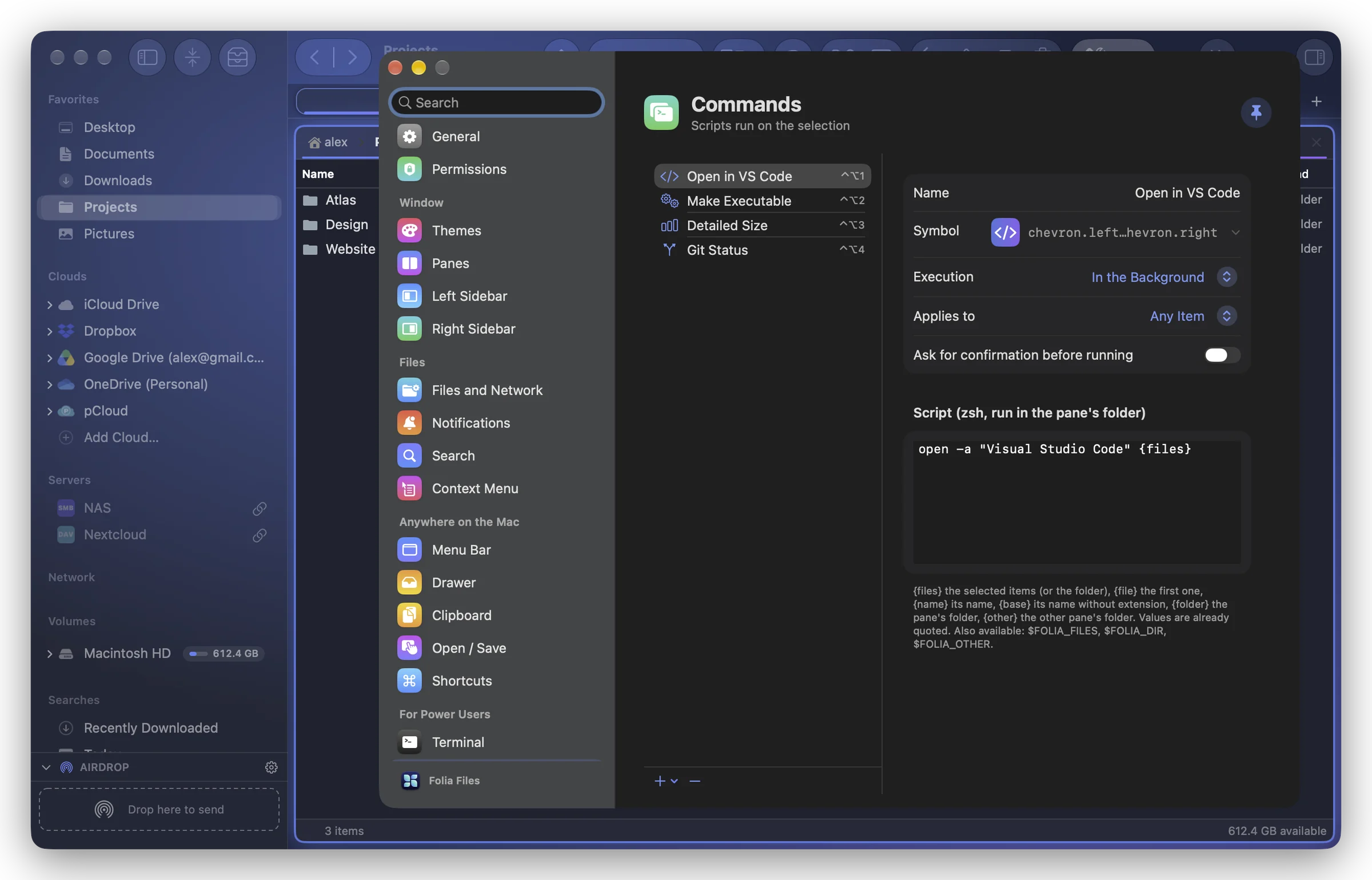
In the script, these placeholders are replaced by values already quoted:
| Placeholder | Value |
|---|---|
{files} | the selected items (or the folder) |
{file} | the first one |
{name} | its name |
{base} | its name without extension |
{folder} | the pane's folder |
{other} | the other pane's folder |
The environment variables $FOLIA_FILES (one path per line), $FOLIA_DIR and $FOLIA_OTHER are also set.
For example, a command that makes a ZIP of each selected folder next to it:
for f in {files}; do ditto -c -k --keepParent "$f" "$f.zip"; doneValues are passed to the script as arguments, never pasted into its text: a file name with quotes or $ can't break it. In the pane's terminal, nothing is typed if a program is running or a command is being typed there; a name with invisible characters is refused there (run the command in the background instead).