
Clipboard history
Everything you copy, text, images, files, links, colors, kept on your Mac to paste again with ⌃⌥V, with the private stuff never kept.
On this page
Folia Files can keep what you copy, so you can paste it again later, in any app. It's off at first: turn it on in Settings › Clipboard › Keep clipboard history.

Paste something you copied earlier
- Press ⌃⌥V in any app (or Edit › Clipboard History… in Folia Files). The palette opens without taking the app you're in out of the front.
- Type to search, or use the arrows.
- Press ↩ to paste it into that app.
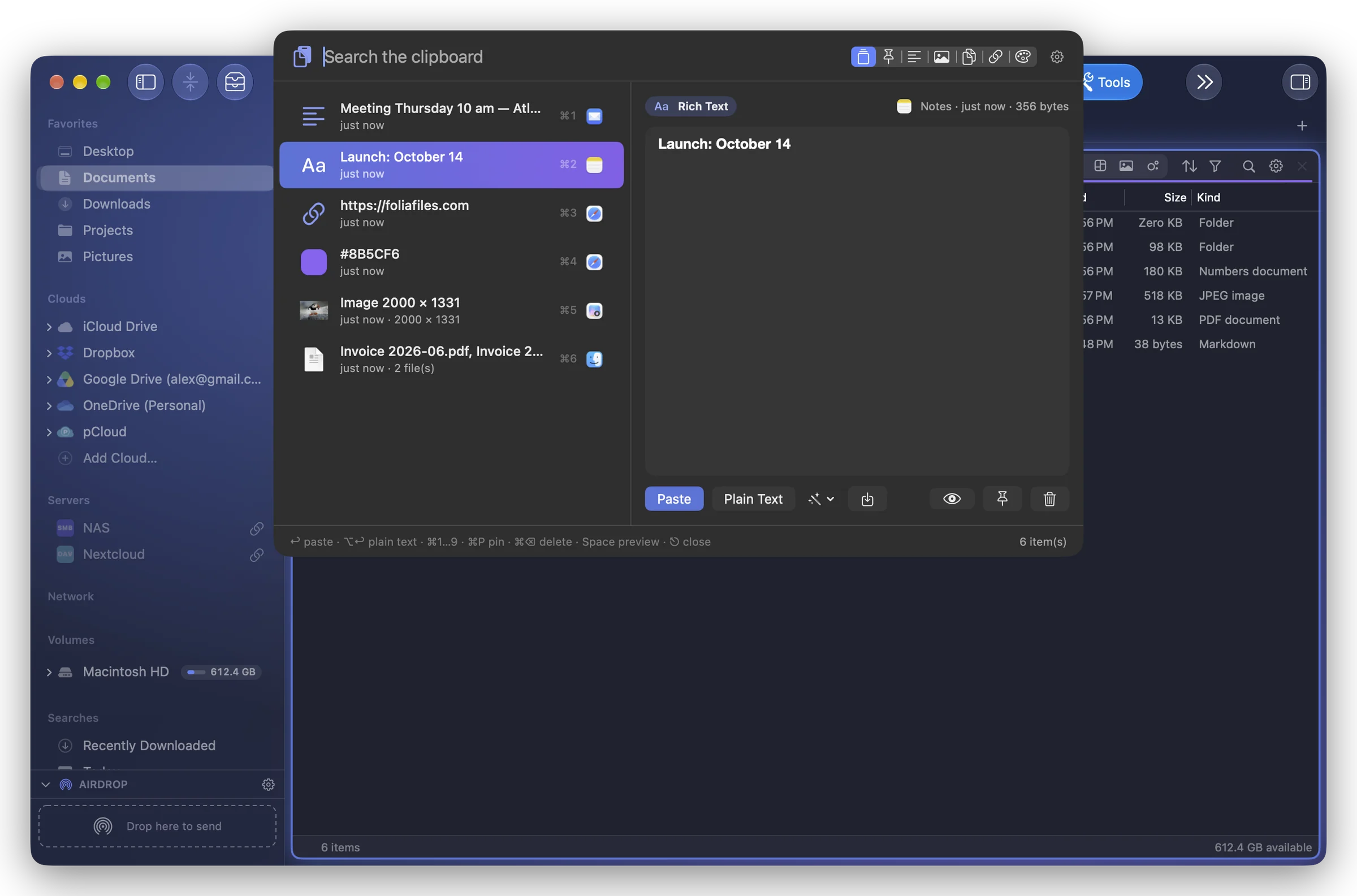
In the palette:
| Keys | Does |
|---|---|
| ↩ | paste |
| ⌥↩ | paste as plain text |
| ⌘1 … ⌘9 | paste one of the first nine |
| ⌘P | pin or unpin |
| ⌘⌫ | delete from the history |
| Space | preview |
Right-click an item for more: Paste Together or Copy Together (several items as one), Copy Transformed / Paste Transformed (UPPERCASE, lowercase, Capitalize Each Word, Remove Extra Spaces, All on One Line, Clean Links (Tracking)), Copy Text in Image, Open Link, Save to “…” or Copy Files to “…” (the active pane's folder), Pin, Delete from History.
The history is also a module of the sidebars and of the drawer, and its last items are in the menu bar menu.
Paste directly, or copy only
When you choose an item:
- Paste it directly into the app (the default): Folia Files presses ⌘V for you. This needs the Accessibility permission: click Allow… and turn Folia Files on in the list macOS opens. Without it, the item is copied and a message says « Copied — press ⌘V ».
- Only copy it (you press ⌘V).
What is kept, and for how long
- Items kept: 50, 100, 200 (the default) or 500. Keep for: 1 day, 7 days, 30 days (the default) or Always.
- Pinned items are kept beyond these limits.
- Above 20 MB, only a thumbnail of the image or the beginning of the text is kept.
- Items copied on your iPhone or iPad (Universal Clipboard) show « Another device (Universal Clipboard) » as their source.
Privacy
- Everything stays on this Mac, in Folia Files' data: nothing goes to iCloud or anywhere else, and it's not in the settings backups.
- What apps mark as confidential (passwords, one-time codes) is never kept.
- Nothing copied from the apps of Privacy is kept: password managers (1Password, Bitwarden, Keychain Access, Passwords, KeePassXC, Dashlane, LastPass, Enpass, Strongbox, Proton Pass, Secrets) are there from the start. Add an App or Stop ignoring this app; Restore Default List.
- Pause the history for 5 minutes, 1 hour or Until Resumed; Clear All… empties it (pinned items too if you tick it).